
New 99Exch account · chat route · 18+ only
99 Exchange Sign Up — Join Fast on WhatsApp — Name, Mobile, 18+ and Done
For a 99 exchange sign up you send three things to the 99Exch desk on WhatsApp: a name, your mobile and a yes to the 18+ question. The reply carries a User Name, a case-sensitive Password and the login link. No boxes to fill, no email step, and the desk answers 24x7.
99 Exchange Sign Up Card — Quick Name and Mobile Check

How the 99Exch Sign Up Runs Without a Form — Fast Four-Step Chat
Most betting sites hand a newcomer a page full of boxes. 99Exch does not. The whole 99exch sign up sits inside one WhatsApp conversation with a desk that answers 24x7, so what you are really doing is asking a person for an ID, not feeding fields to a server that rejects you over a missing postcode.
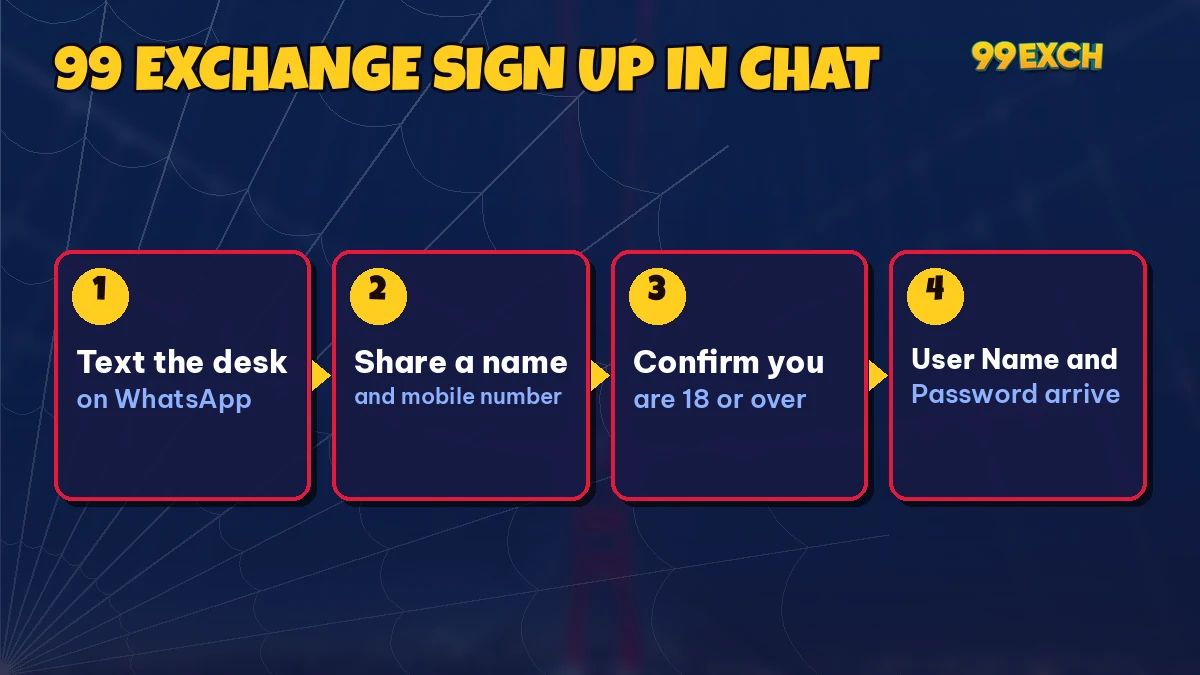
Four moves. That is the entire route:
- Use the phone whose number you plan to register, so the SMS copy and the chat end up on one handset, and open a thread with the 99Exch desk.
- Send a name and a contact number, ideally the mobile that is in your hand right now.
- Answer the 18+ question with a clear yes, since the age confirmation is part of every new 99Exch ID request.
- Read the reply: your User Name, your Password and the login link arrive in that same chat.
Next stop is 99exch.red, or whichever ending opens on your network, where the two strings go into the boxes sitting above the reCAPTCHA notice. By the desk's own estimate a brand-new ID is ready in about a minute. Deposits, tables and the demo route are mapped on the 99Exch ID page.
What the 99Exch sign-up card above really does
It opens the official 99Exch page in a new browser tab. That is all. The boxes for name and mobile are a checklist so you have both ready, and they are not wired to send anything anywhere; get99exch.in stores none of it.
Real limits of that card for your 99Exch account
It cannot create an account by itself. Only the 99Exch desk issues a User Name and Password, inside the WhatsApp thread, which is why every route on this page ends in that chat sooner or later (probably sooner).
The contrast with a typical sign-up page is easiest to see side by side, so here is the 99Exch chat route next to the long-form pattern most people have met somewhere else:
| Point of comparison | Usual long registration form | 99Exch sign up by chat |
|---|---|---|
| What you fill in | Many fields, each checked by the page | A name and a contact number, sent as a message |
| Age check | A date-of-birth box | You confirm 18+ when the desk asks |
| Where the login details appear | An email or a confirmation screen | The same WhatsApp chat, with the login link |
| Who sets the User Name | You pick one and hope it is free | The 99Exch desk issues it with the Password |
| If something goes wrong | An error message on the form | A person replies in the thread, 24x7 |
A word on the card's mobile box, since people ask. It accepts ten digits starting with 6, 7, 8 or 9, the shape of an Indian mobile number, and it will complain about a landline or a number with the +91 prefix pasted in. That check happens in your browser only. Its job is to catch a typo before you repeat the same typo to the 99Exch desk, nothing more.
People sometimes expect an email confirmation, an OTP screen or a page asking for documents. None of that appears in the flow the 99Exch desk describes. If a site you landed on asks for a long registration form with a dozen fields and calls itself 99Exch, treat that as a reason to stop and check the address first.
Sample 99Exch Register Chat — What a Genuine Desk Thread Looks Like
Below is a composite thread, stitched from the steps the 99Exch desk lists. No real person, no real number.
You: Hi, I would like a new 99Exch ID, please.
Desk: Sure. Send your name and your mobile number in one message.
You: [your name] · [your 10-digit mobile]
Desk: Thanks. Please confirm you are 18 or older.
You: Yes, I am over 18.
Desk: Done. Your User Name, Password and login link are below. Both the name and password are case-sensitive, so copy them exactly.
Notice that the second bubble asks for name and mobile together. Sending both in one go, with the 18+ yes added on the end if you like, saves the desk a round of follow-up questions and is the quickest version of this whole exchange on 99Exch.
Short, right? The bit that trips people up is not the chat at all but what they type into it, and the exchange on the 99Exch side is mostly the same handful of lines every time.
- You send to 99Exch
- A name you want on the account
- You send to 99Exch
- A contact number that is yours
- You confirm
- That you are 18 or older
- You get back
- A User Name, typed exactly as it must be entered
- You get back
- A Password, also case-sensitive
- You get back
- The login link that opens the 99Exch sign-in screen
One small thing. ID details can reach you by WhatsApp or by SMS, so the number you give the 99Exch desk matters more than it looks. A typical slip goes like this: someone registers from a cousin's phone during an evening match, the text copy lands on the cousin's handset, and two days later the password is gone along with the chat. Give your own number and you skip that whole mess.
Notice what is missing from the list, too. The 99Exch flow asks for a name and a contact number, then the age confirmation, and that is where it stops; nothing in it involves typing a bank account into the chat at sign-up. Money details belong to the deposit step later, handled from the one 99Exch balance. If a thread that claims to be the desk asks for a payment before it will hand over an ID, you are talking to the wrong thread.
First 99Exch Login After Account Create — Secure Start in the Right Order
You have the User Name and Password. Now what? Tap the login link the 99Exch desk sent, rather than typing an address from memory, because memory is how people end up on a parked domain instead of the real sign-in screen.
In our 11 Oct 2026 check, four 99Exch endings opened that sign-in screen, and two well-known names did not:
| Ending you might type | Result we saw, 11 Oct 2026 | Good for sign-in? |
|---|---|---|
| 99exch.red | Sign-in screen with User Name and Password | Yes |
| 99exch.live | Same sign-in screen as .red | Yes |
| 99exch.green | Same sign-in screen as .red | Yes |
| 99exch.win | Same sign-in screen as .red | Yes |
| 99exch.io | 404, no site | No |
| 99exchange.com | Domain-for-sale holding page | No |
Why put a dead domain in a sign-up table? Because 99 exchange said out loud turns into 99exchange.com when typed, and in our 11 Oct 2026 check that address was a for-sale holding page with no connection to 99Exch whatsoever. Nothing registered or entered there reaches the desk. Separately, Indian networks block betting domains every so often, and your 99Exch ID and it's balance do not care which working ending you open.
The screen behind that link is plain: a User Name box, a Password box, then Login and, underneath, Login with Demo ID. Each element gets its own breakdown on the 99 Exchange login page. A sensible first session runs roughly in this order:
- Copy the User Name and Password out of the 99Exch chat character for character. Capitals count.
- If you only want to look around, Login with Demo ID gives practice play with no deposit. You can try it before the 99Exch credentials from the desk ever come into play.
- Android phone? Download .apk sits on the sign-in screen, covered on the 99Exch APK page. iPhone owners have no APK and use the browser plus Add to Home Screen instead.
- When you do fund the account, the minimum is ₹100 over UPI or bank transfer, set out on the My 99 Exchange page.
- Planning a bigger opening deposit? ₹5000 is the figure that earns the 5% first-deposit bonus, and the Welcome to 99Exch page owns those terms.
After the first 99Exch login — one live balance for everything
Once the 99Exch credentials work, the ID is the whole account. There is a single balance behind it, so the money you add serves cricket and the other sports markets as well as the casino tables, and deposits and withdrawals both run from that same pot. You do not need a separate sign up for the casino side, and you do not register again when one address stops loading. The 99 Exchange com page lists the sports in the lobby if you want to see what the new ID opens.
Bookmark the the link that arrived in the chat, not whatever a search result offers next week. Search results for 99Exch addresses shift as domains get blocked and replaced; the link from the desk was correct on the day you received it, and the desk can send a fresh one if it stops loading.
Nothing on that list is compulsory on day one. Plenty of new 99Exch users just log in, check that the credentials work, close the tab and come back on match day. Fine. That quick check is probably the most useful test you can run.
99Exch Sign Up Mistakes to Avoid — Safe Habits From Day One
Most sign-up problems at 99Exch are self-inflicted. Not all, but most, and they cluster around the same few habits that seem harmless in the moment and only cost you something a week later when a withdrawal or a password reset needs the details you gave on day one.
- Giving a number that is not yours. SMS copies of your ID can go there, and getting them back means another round with the 99Exch desk.
- Putting a relative's name on the ID. Dad's name, your bank account: that pairing stalls the first 99Exch withdrawal, because payouts only go to a bank account held in your name.
- Retyping credentials with autocorrect on. Phones love to capitalise the first letter. User Name and Password are case-sensitive, and one changed letter is a failed login.
- Sharing the chat screenshot. The thread holds your User Name, Password and login link together; a screenshot sent to a friend is the whole account sent to a friend.
- Signing up through a look-alike address. If the page asks for a long form, or the address is something like 99exchange.com, it is not the 99Exch route described here.
- Archiving the thread before noting the details. The 99Exch credentials live in that chat. Clear it on a whim, lose the phone a month later, and a two-second copy job has become a Password Issue request.
- Asking for a second ID instead of a reset. One 99Exch ID already works on every working address; a forgotten password is a reset job, not a reason for a new account.
Under 18? Then this page is not for you, and the 99Exch desk asks for that confirmation for a reason. If betting has stopped feeling like a choice, the responsible gaming page lists the free Tele-MANAS helpline, 14416.
About the name, specifically. The 99Exch desk does not hand you a form with a "legal name" label, so it is tempting to send a nickname or a team handle. Resist that. Since 99Exch pays withdrawals into a bank account held by you, the name on the ID should be the one your bank knows, spelled the way your bank spells it; a mismatch here is the kind of thing nobody notices at sign-up and everybody notices at the first withdrawal.
Stuck 99 Exchange Sign Up? Quick Fixes With 24x7 Support
Sometimes the chat stalls, or the credentials refuse to work, or the link opens a blank page. Annoying. The table matches each symptom of a stuck 99 exchange sign up with the most likely cause and the shortest fix, and nearly every fix ends with one specific department on the 99Exch desk rather than a generic "contact support" message.
| What you see | Likely cause | What to do |
|---|---|---|
| No reply yet in the chat | Details sent in pieces, or the message went to the wrong number | Check the number is +91 81097 11726, then resend name, mobile and 18+ confirmation as one message |
| Login fails on the first try | Case changed, or a space copied after the password | Copy again from the 99Exch chat, paste carefully, no trailing space |
| Login link will not load | That address may be blocked on your network | Try another working ending such as .red, .live, .green or .win with the same ID |
| Chat deleted, password lost | Phone changed or thread cleared | Ask the Password Issue department on the 99Exch desk |
| Text with the ID went to another phone | A different number was given at sign-up | Tell the 99Exch desk in the same chat and ask for the details to be resent there |
| Desk asks for your details again | The first message missed the age confirmation | Reply with name, mobile and a clear yes to 18+ |
| First deposit not showing | Payment still being matched | Message the Deposit Issue department with the payment details |
Each problem has a home at the 99Exch desk. A lost password goes to Password Issue, a missing top-up to Deposit Issue, payout questions to Withdrawal, and a sign-up that never finished back to New ID. Support runs 24x7 on WhatsApp and Telegram; the 99Exch WhatsApp number page explains how the desk number is meant to be saved, and the 99Exch com login page covers the reset itself.
A clean first line looks something like this: the department name, the 99Exch User Name if you have one, and the mobile number you signed up with. Three facts, one mesage. Compare that with a bare "hello, not working", which forces the desk to ask the same three things back one at a time, and the difference is a few extra rounds of waiting on what should have been a quick fix.
And if you are not sure whether the problem sits with the 99Exch account or your phone? Open the sign-in screen on a different working address first. If it loads there, the account is fine and the block was local, which is the usual answer.
99 Exchange Sign Up FAQ — Quick Verified Answers
How do I sign up on 99 Exchange?
Sign up happens inside the 99Exch WhatsApp desk chat rather than on a web page. Your part is three replies: the request for an ID, your name with your mobile number, and an 18+ confirmation. The desk's part is one reply holding the User Name, Password and login link.
Is 99Exch registration free?
Nowhere in the chat request will you see a payment field; the 99Exch desk wants your name, your mobile number and a yes to the 18+ question. Money only enters later if you choose to deposit, and the 99Exch minimum deposit is ₹100 through UPI or bank transfer.
What details does 99Exch need to create an account?
Only a name and a contact number, plus confirmation that you are 18 or over. There is no long application form on the 99Exch sign up route. Use a number that is genuinely yours, because your ID details can arrive by WhatsApp or by SMS.
How long does a 99Exch sign up take?
Roughly a minute, by the 99Exch desk's own estimate, counted from the moment your name, mobile and age confirmation are all in the chat. Splitting them over several messages usually slows things down. Once ready, the User Name, Password and login link show up in that WhatsApp thread.
Can I register on 99Exch online without WhatsApp?
The sign-up flow the 99Exch desk describes runs through WhatsApp, and there is no separate web registration form. The card on this page only opens the official 99Exch page in a new tab. Telegram is also a 24x7 support channel, so ask there if WhatsApp is unavailable.
What is the age limit for 99 Exchange sign up?
You must be 18 or older. The 99Exch desk asks you to confirm your age before it issues a User Name and Password, and the sign-up card on this page carries a required 18-plus checkbox. If you are under 18, do not register.
Can I create two 99Exch accounts?
There is no need to. One 99Exch ID and one balance already work on every working address, and that balance covers sports and casino alike. If you lost access to your first ID, contact the Password Issue department on the desk instead of asking for a fresh account.